AWS MAP Funding: How the Migration Acceleration Program Works, Who Qualifies, and How to Apply
AWS will co-fund a migration it believes in. This guide covers the three MAP phases, what each is worth as a share of projected ARR, who qualifies, what the funding does and does not cover, and how to build an application AWS approves.
Executive summary
- AWS MAP is the Migration Acceleration Program: a funding and delivery framework for moving an existing estate onto AWS.
- It funds four kinds of work — assessment, readiness, migration and modernisation — rather than handing over a lump sum.
- Funding arrives through three mechanisms: AWS credits on your account, partner funding for professional services, and incentives paid once workloads are live.
- The programme runs in three phases. Each one is a gate: you prove the previous phase before the next is funded.
- Funding is sized against your projected annual AWS spend after migration, not against what the migration costs you.
- Eligibility turns on workload scope, readiness, the quality of the business case, and AWS approval — in roughly that order of weight.
- The July 2024 overhaul raised the partner funding ceiling substantially and added a faster approval path for qualified partners.
- MAP does not cover your internal engineering time, procurement, business acceptance testing, training or change management.
- Most applications that stall stall for the same reason: no credible workload inventory and no TCO model behind the numbers.
- MAP suits data centre exits, VMware exits, SAP, Microsoft and mainframe workloads, and legacy modernisation. It suits proofs of concept badly.
Warqline is an AWS partner enrolled in MAP. If you want to know whether your estate qualifies before you spend three weeks assembling a submission, book a technical call — 45 minutes, and you get an answer rather than a proposal.
Cloud migration stopped being a technical decision some time ago. VMware licensing costs, hardware refresh cycles that keep arriving, and the operational risk of an estate nobody wants to touch have all pushed it up to the board. By the time an architect is asked to draw anything, the question is rarely whether AWS is the right destination.
The hard part is funding the move. A migration has a period — often a long one — where you are paying for the old estate and the new one simultaneously, and where the engineering effort is entirely cost with no visible return. Finance sees that shape and asks reasonable questions. The Migration Acceleration Program exists to flatten it.
This guide explains what MAP actually funds, how much, on what conditions, and what it will not touch. It is written for the person who has to make the case internally, not for the person writing the press release.
What AWS MAP actually is
MAP is a structured programme that pairs funding with a delivery methodology. AWS co-invests in migrations it expects to produce durable consumption, and in return it wants the migration run in a way that makes that consumption likely: a real assessment, a landing zone built properly, workloads moved in waves, and cost and security addressed rather than deferred.
Enrolling gives you access to four things:
- Migration tooling and, for qualified migrations, licensing that AWS makes available at no cost
- A partner that has run the process before and knows what AWS reviews
- Funding across the assessment, readiness and execution phases
- A phased framework that forces the sequencing most migrations get wrong
That last point is the one that gets undersold. Plenty of migrations fail not from lack of budget but from lack of sequence — workloads move before the landing zone exists, guardrails arrive after the first production cutover, and cost visibility arrives after the first invoice. MAP's phase structure exists to prevent exactly that, and the funding is the incentive to follow it.
The three funding mechanisms
MAP funding is not one instrument. It reaches you three different ways, at three different points in the project, and confusing them is the most common reason a finance model built around MAP turns out wrong.
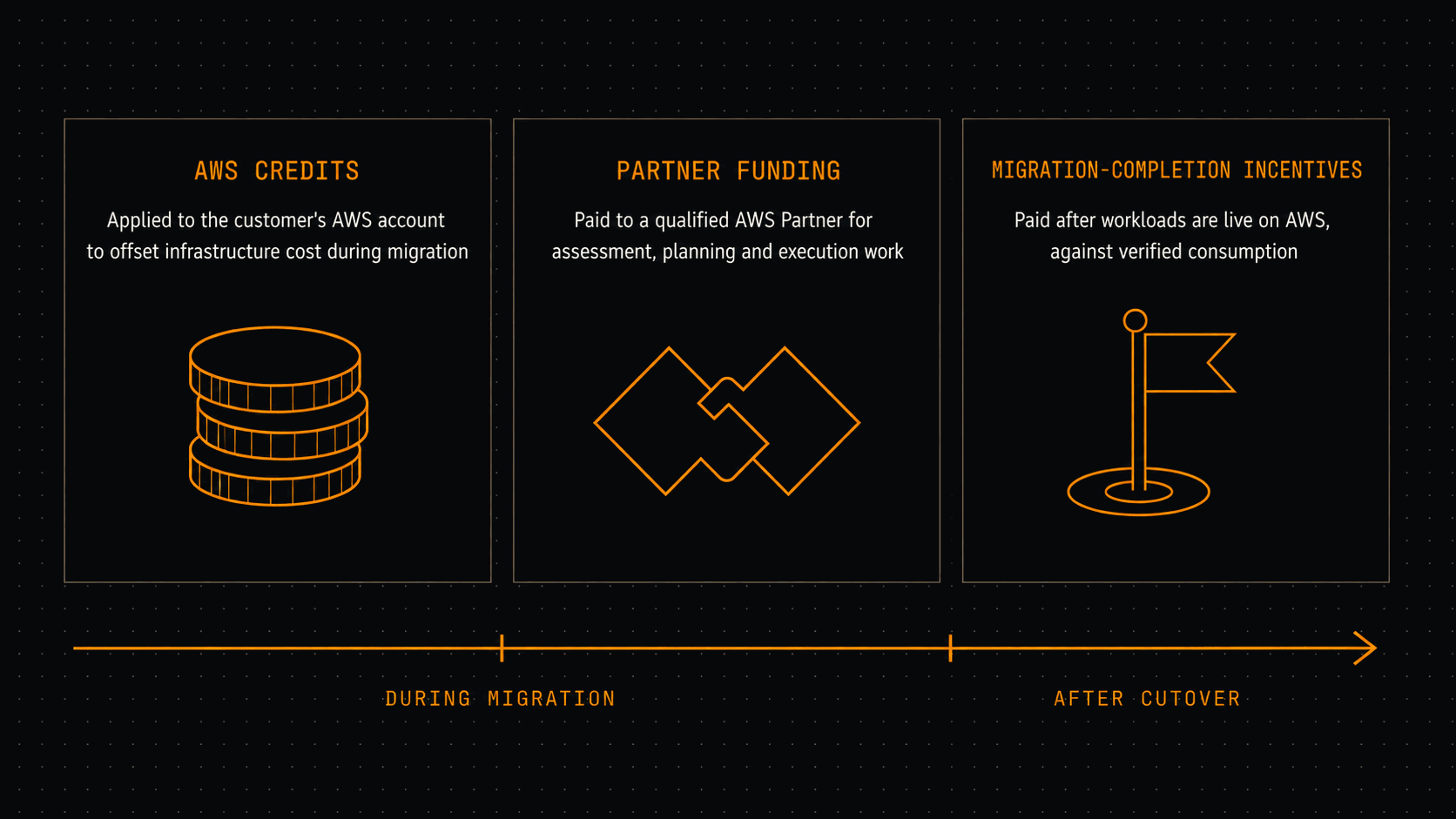
AWS credits. Applied directly to your AWS account to offset infrastructure consumption during and after the migration. These are the mechanism most people mean when they say "MAP funding", and they are the only one that lands on your bill.
Partner funding. Paid to the AWS partner, not to you, to cover assessment, planning and execution work. It reduces what the engagement costs you rather than what AWS costs you. Treating it as a discount on your AWS bill will put a hole in your model.
Migration-completion incentives. Paid once workloads are genuinely running on AWS, measured against actual consumption. This is the part that is earned rather than granted, and it is why AWS cares so much about the credibility of your projected usage.
The split matters when you build the business case. Credits change your cloud run-rate; partner funding changes your professional services line; completion incentives arrive late and should not be counted on to fund the work that produces them.
The three MAP phases
MAP runs Assess, Mobilize, then Migrate and Modernize. Each phase is funded separately and each is a gate — AWS funds the next phase on the evidence produced by the last one. The AWS Cloud Adoption Framework is the structure underneath, which is why the assessment covers business, people, process, platform, operations and security rather than just servers.
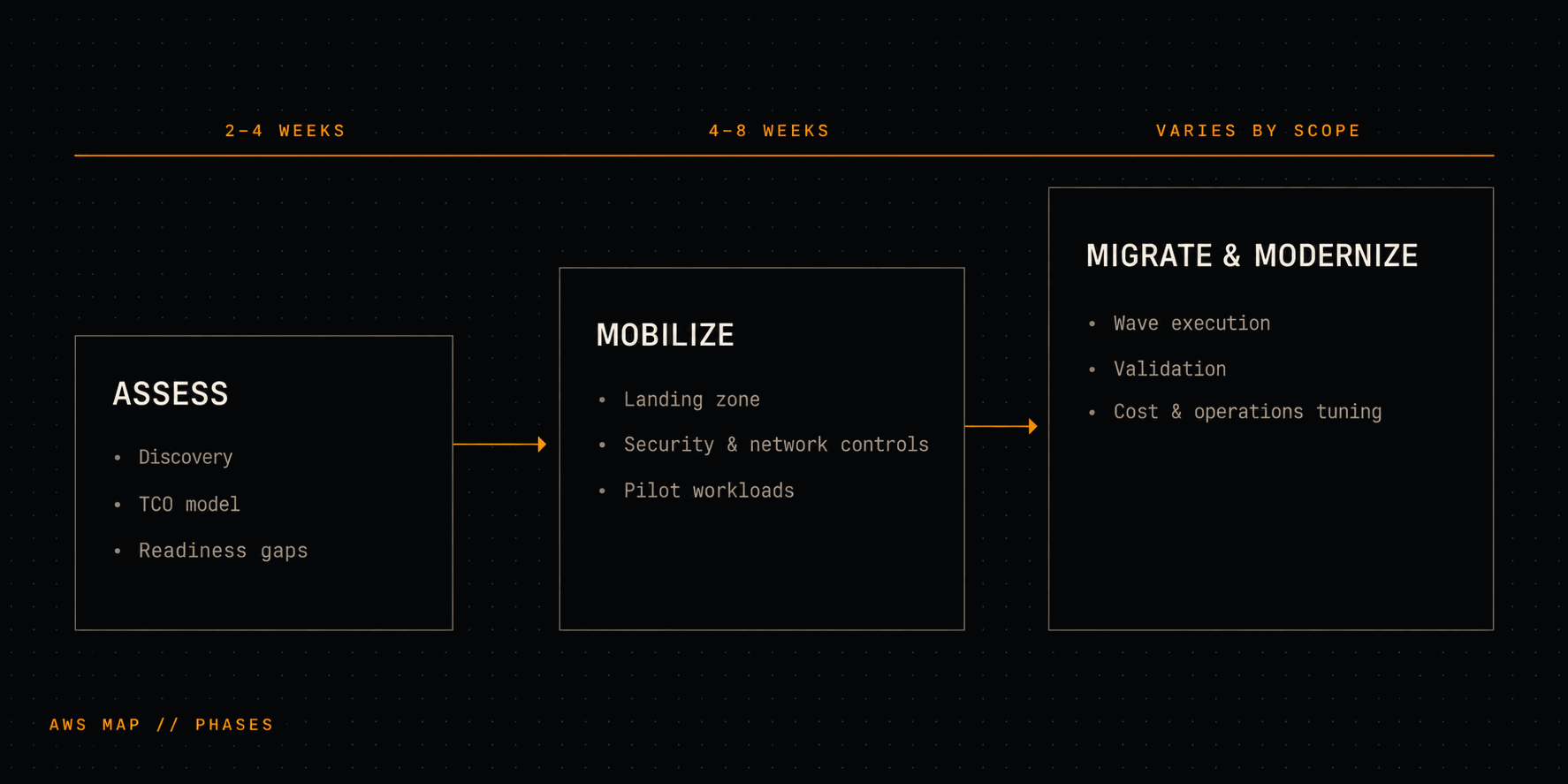
Assess. Discovery across the estate, a workload inventory that survives scrutiny, a TCO model, and an honest list of readiness gaps. The output is a decision, with numbers behind it.
Mobilize. Close the gaps the assessment found. Build the landing zone, establish the operating model, put network and security controls in place, and move a small number of pilot workloads to prove the pattern. Nothing at scale moves in this phase, deliberately.
Migrate and Modernize. Workloads move in waves. Each wave is validated before the next starts. Then the work that actually produces the savings — right-sizing, storage tiering, managed service adoption, security hardening — happens against live systems rather than being written into a plan and forgotten.
How the funding is allocated across the phases
Two things about the numbers, before the numbers.
First, the sizing base is projected annual recurring revenue — what AWS expects to earn from the migrated workloads in a year — not what your migration costs. A migration with a large one-off effort and a small steady-state footprint attracts less funding than the effort would suggest. That surprises people.
Second, the specific percentages below are widely and consistently reported by partners and cost-management vendors, but they are not published by AWS as a public rate card. Treat them as the shape of the thing, confirm the actual figures with AWS or your partner, and do not put them in a board paper as commitments.
With those caveats:
- Assess — around 5% of projected ARR, subject to a cap in the region of $75,000.
- Mobilize — around 20% of projected ARR.
- Migrate and Modernize — around 15–25% of projected ARR, delivered as AWS credits.
The July 2024 revision of the programme is worth knowing about, because a lot of writing on MAP predates it and still quotes the old ceilings. It raised the maximum partner funding available on a single engagement to roughly $2M, up from a figure closer to $460,000, and introduced a faster approval route for qualified partners on migrations up to around $10M in projected annual recurring revenue. If your estate is large, the programme is materially more generous than a 2023-vintage guide will tell you.
Approval timelines
Timelines depend on the phase, the size of the request, and — mostly — how complete the submission is.
- Assess — typically two to four weeks to review and approve.
- Mobilize — typically four to eight weeks.
- Migrate and Modernize — varies with scope and complexity, and with AWS's own approval cycles.
Once approved, credits appear on the account after AWS processes the approval. Partner funding does not: it depends on validated milestones and a submitted claim, which means the partner carries the work before the funding lands. Plan the cash flow accordingly.
What AWS says MAP is worth
AWS publishes four figures on the MAP homepage. They are AWS's own claims about its own programme, based on its own customer base, and they should be read as such — but they are the numbers your CFO will find if they go looking, so it is better to introduce them yourself with the caveat attached.
AWS states that MAP can reduce total migration cost by up to 25%; that customers migrating legacy applications see an average of 31% infrastructure savings; that moving from on-premises to AWS produces a 69% reduction in unplanned downtime; and that customers run infrastructure management 62% more efficiently after migrating.
None of these are guarantees and none of them are contractual. What they are useful for is framing: they tell you which benefits AWS believes it can defend, and therefore which benefits your business case should be built around. A case built on downtime reduction and operational efficiency is arguing on ground AWS has already prepared. A case built on a savings figure you invented is not.
Who qualifies
MAP is aimed at organisations with a real estate to move, a defensible reason to move it, and enough projected consumption to make AWS's co-investment rational. AWS lists VMware, Microsoft, SAP and mainframe workloads as supported categories, which covers most of what sits in an enterprise data centre.
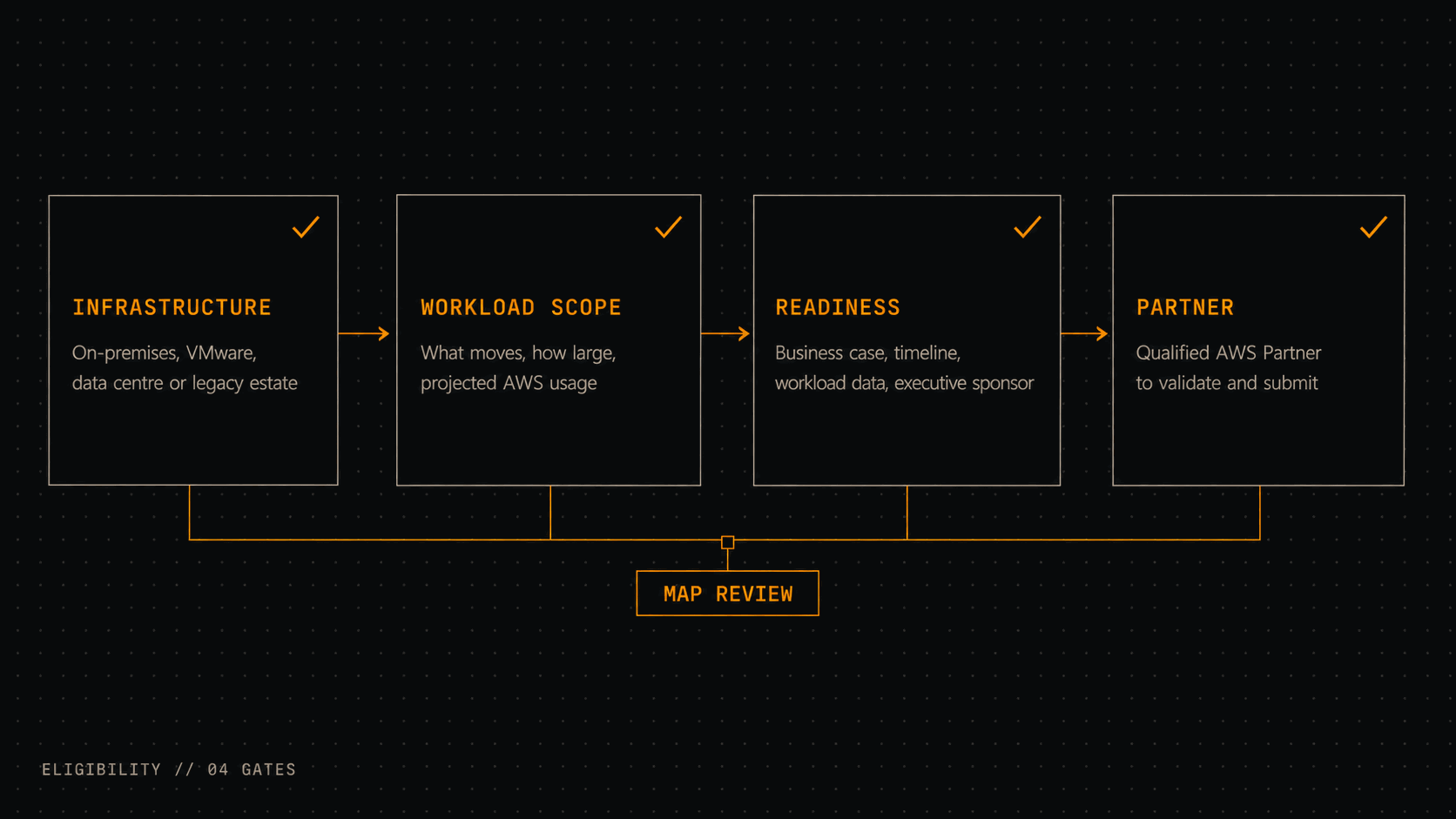
Infrastructure. On-premises systems, VMware platforms, data centre estate, hosted workloads, or legacy systems that need to move. Something has to be migrating from somewhere.
Workload scope. What moves, how much of it, and what the AWS footprint looks like afterwards. This is the input to the funding calculation, so it is the part AWS reads most carefully.
Readiness. A stated reason for the migration, a timeline that a reasonable person would believe, workload data that exists rather than being promised, an executive sponsor, and someone internally who owns the project. Readiness is where most applications are actually weak.
Partner involvement. Not formally mandatory, but a partner enrolled in MAP validates eligibility, builds the funding case in the shape AWS expects, and handles the submission. The difference between a submission that reads like a MAP application and one that reads like a project plan is measured in weeks.
How to apply, in five steps
1. Check the fit before you build anything
Establish whether your workloads, current estate, scope and business goals plausibly meet the MAP criteria. This takes a conversation and a rough workload count, not a discovery project. Doing it first saves you from assembling a submission for a programme you were never going to qualify for.
2. Engage a partner enrolled in MAP
This is the step with the largest variance in outcome. A partner that has run MAP engagements knows what AWS reviews, what evidence satisfies it, and where a submission will be sent back. One that has not will produce something technically accurate that takes three rounds to get approved.
3. Build the business case
What is moving, why it matters, what it costs, and what the estate looks like operationally afterwards. Finance and engineering need to be looking at the same document — one that carries the workload inventory, the TCO model, the risk register and the projected AWS consumption in a single place. This document is the application, in substance.
4. Submit
Your partner assembles and submits the request: workload detail, projected usage, phase plan, milestones. AWS reviews it and decides whether the project qualifies and at what level.
5. Execute against the plan, and track it
After approval, the funding stays tied to the plan you submitted. That means tracking migration progress, actual AWS consumption against projection, milestone completion and cost movement. Partner funding in particular is claimed against validated milestones, so tracking is not administrative overhead — it is how the money arrives.
Working out what your submission would actually look like is a short conversation. Talk to an engineer about scope, funding fit and what your business case is currently missing.
How much funding can you actually get
There is no published figure that applies to every company, because the calculation runs off your projected AWS consumption rather than off a tier list.
The reported ranges
The percentages in the phase section above are the working shape: roughly 5% of projected ARR for the assessment with a cap around $75,000, roughly 20% for mobilisation, and roughly 15–25% delivered as credits during migration and modernisation. Since July 2024, qualified partners have had a faster route for migrations up to around $10M in projected ARR.
That ceiling is a threshold for a process, not an entitlement. It means opportunities of that size can be approved faster when they meet the criteria — not that a $10M ARR migration receives a fixed proportion of anything.
What moves the number
Four things, in descending order of influence: the workloads you are actually committing to move, the projected AWS consumption once they are running, the migration timeline, and how well documented the case is.
AWS also weights strategic fit. A data centre exit, a VMware exit, an SAP or Microsoft workload migration, or a mainframe migration all carry more weight than an equivalently sized migration of general-purpose compute, because they are the migrations AWS most wants to win.
Documentation is the variable you control. A workload list with owners and dependencies, a TCO model whose assumptions are stated, a wave plan with dates, and a named executive sponsor will get a request reviewed faster and sized more generously than the same migration described in prose. AWS is not being difficult about this — it is sizing an investment, and the quality of your evidence is the only thing it has to go on.
What MAP covers, and what it does not
MAP reduces the financial pressure on a migration. It does not remove the need for a budget, and the gap between those two statements is where projects get into trouble.
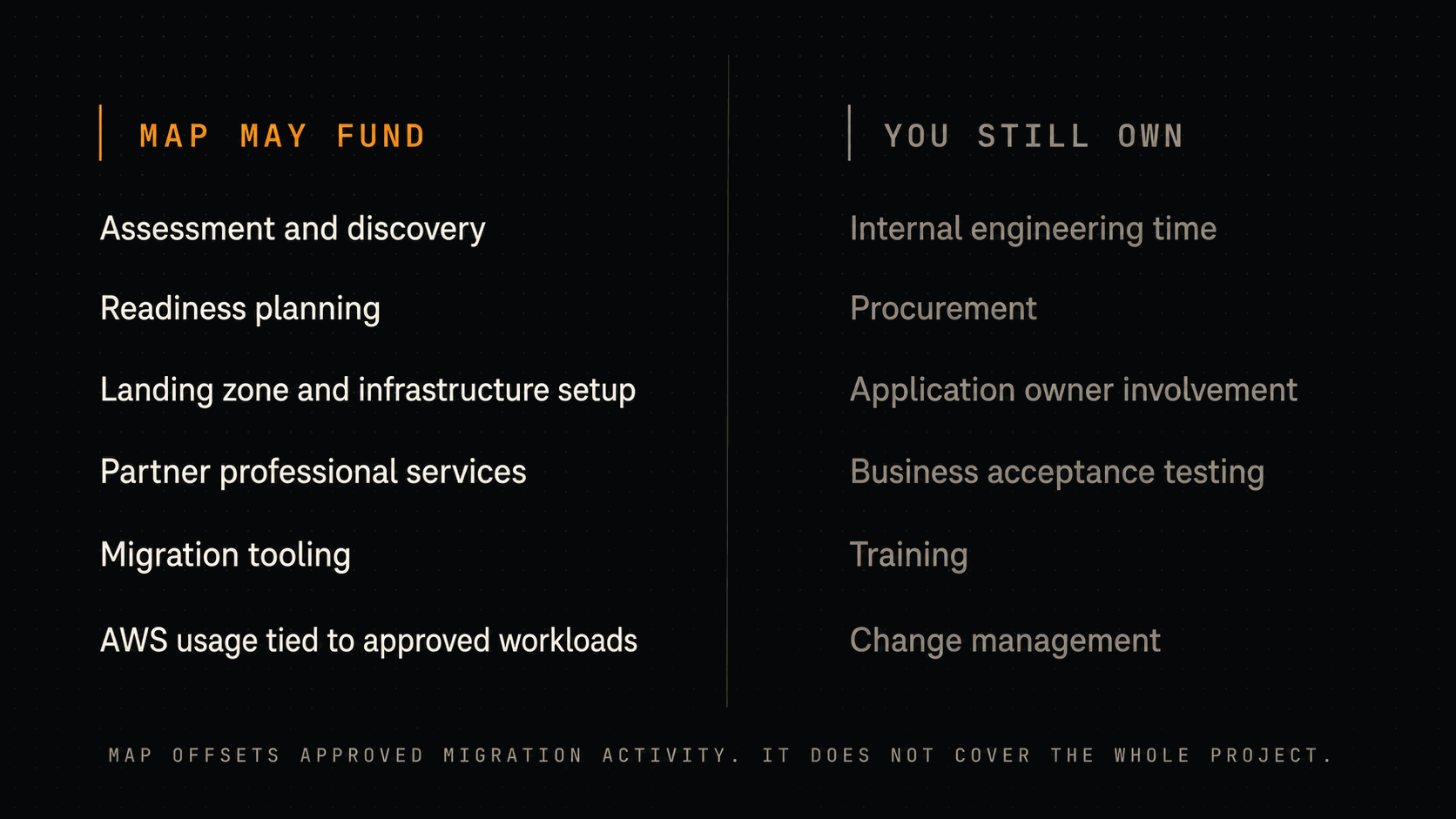
Generally fundable: assessment and discovery, readiness planning, landing zone and infrastructure setup, partner professional services, migration tooling, and AWS consumption tied to approved workloads. AWS also makes optimised software licensing and validated migration tooling available at no cost for qualified migrations, which is worth modelling because it changes the assessment arithmetic.
Not fundable, and yours: internal engineering time, procurement lead time, application owner involvement, business acceptance testing, training, and change management. These are usually the largest single line in a migration's true cost, and they are entirely on you.
The misconception worth killing: that MAP covers the migration. It offsets approved migration activity, against milestones, subject to approval. A plan that only works if MAP arrives in full is not a plan. Build the case so that MAP improves a project you would defend anyway.
Where MAP applications go wrong
Four failure modes account for most of it.
Moving before assessing. Skipping discovery means finding the application dependencies, data transfer requirements, access controls and undocumented integrations during the cutover instead of before it. Every one of those is cheap to handle in the Assess phase and expensive to handle in a maintenance window.
Lifting and shifting an architecture that should have changed. A 2025 migration study found that moving from private to public cloud while preserving the same software architecture could increase costs by as much as 50%. Instance sizing, storage design, database choice and managed service adoption are where the savings in the business case actually come from. Move the architecture unchanged and you have bought the same estate at cloud prices.
Underestimating blast radius. Migration touches identity, networking, security rules, reporting, integrations and the people who use the systems. Scope that covers only servers and databases is scope that will grow during execution, which is exactly when growing it is most expensive.
No cost control during the migration. Without tagging, budget alerts and a regular spend review, the temporary environments and oversized instances that a migration necessarily creates stay up and stay large. Finance finds out on the invoice, which is late enough to damage the credibility of everything else in the business case.
MAP, Activate, and standard credits
AWS runs several funding paths and they are not interchangeable.
| Programme | Best for | What it supports | When to use it |
|---|---|---|---|
| AWS MAP | Organisations planning a migration or modernisation project | Assessment, planning, partner services, AWS credits, approved workload movement | Moving applications, databases, infrastructure, VMware, SAP, Microsoft or mainframe workloads onto AWS |
| AWS Activate | Startups building or scaling on AWS | Startup credits, technical resources, startup support | An eligible startup that needs credits to build, test or scale a product |
| Standard AWS credits | Smaller projects and general usage | AWS service usage credits | Limited support for AWS consumption without a migration programme attached |
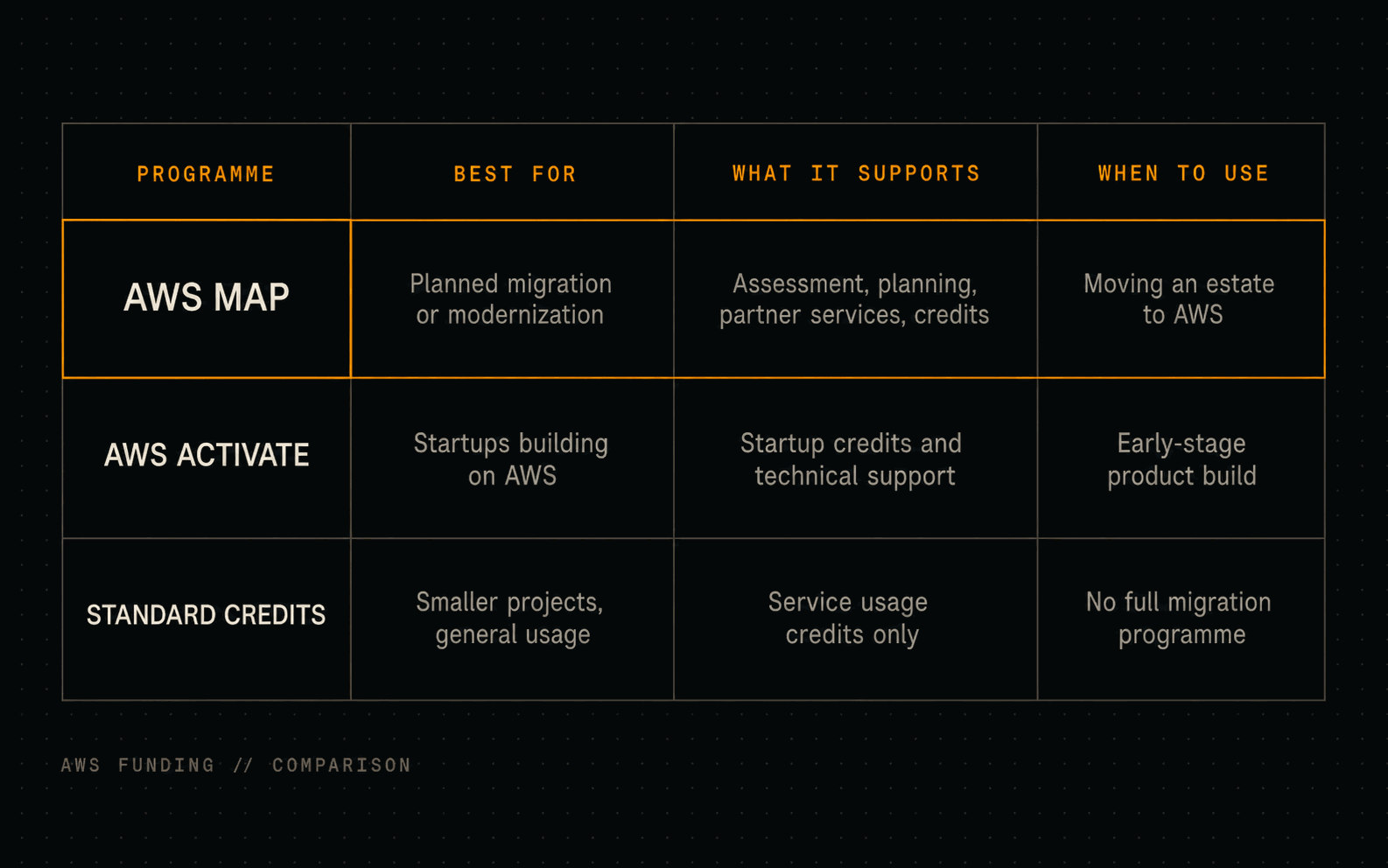
The distinction is about whether something is migrating. Activate is for a product being built on AWS from the start; its packages run from around $1,000 for early-stage self-funded founders up to $100,000, and in some cases higher, for startups meeting the pre-Series B eligibility criteria. If you have an estate to move, Activate is the wrong instrument regardless of company size.
When MAP fits, and when it does not
It fits a data centre exit, a VMware exit, an SAP or Microsoft workload migration, a mainframe migration, or a legacy modernisation programme. It fits particularly well where you will be running the old and new estates in parallel for a period, because that overlap is the cost MAP is best at absorbing.
It does not fit very small workloads, short-term experiments, or projects where the scope is still a discussion. If you only need credits for AWS consumption, or you are building a proof of concept, MAP's process overhead will cost you more than the funding is worth.
You are ready when you know which workloads move, why the migration matters to the business, which risks need controlling, and who owns the project internally — and when you have an executive sponsor, workload data that exists today, and a defensible view of what your AWS bill looks like a year after cutover. Missing more than one of those, and the right next step is assessment work, not an application.
How Warqline supports a MAP-funded migration
We are an AWS partner enrolled in MAP, and migration is the work rather than an adjacent service. What that means in practice:
Funding fit and the business case. We establish whether the estate qualifies and roughly what band of funding it sits in, before you commit engineering time to assembling a submission. Then we build the case in the shape AWS reviews: workload inventory, TCO model, migration scope, risk controls, projected consumption, and the value the business gets. Your CFO reads a funding and cost model; your CIO reads a technical path. Same document.
Dependency mapping and a phased roadmap. Migration risk is almost never in a single workload — it is in how workloads touch each other. A customer-facing application depending on a shared database. A reporting workflow resting on a legacy file transfer. A finance system whose access rules exist only in the current environment. We map applications, databases, integrations, identity and security controls first, then wave-plan around what we found. That is what makes cutovers uneventful.
Architecture that does not import the old cost model. Where a workload should change, we say so and design for it — right-sizing, managed services, storage tiering, and the AWS services that fit the shape of the workload rather than the shape of the server it used to run on. This is the difference between a migration that produces the savings in the business case and one that produces a bill.
Cost visibility while the migration is running. Tagging, budget alerts, consumption tracking against projection, and a regular spend review, in place from the first wave. Both because it protects the budget and because MAP funding is claimed against verified consumption — the same instrumentation does both jobs.
VMware exit continuity. Keeping the existing platform stable and supported while the AWS target is built and the waves execute, so the exit is a planned sequence rather than a deadline you are running at.
Optimisation after the last wave. The savings in a migration business case are realised in the months after cutover, not during it. We stay on the cost and performance work until the run-rate matches what the case promised.
Book a 45-minute technical call to review your estate, confirm MAP fit and agree the next step. No sales pitch — architecture.
FAQs
Can I apply for AWS MAP funding if the migration has already started?
Yes, though earlier is better. AWS will review the remaining scope, the projected consumption, the business case, and whether what is left still fits the programme's requirements. Workloads already migrated generally do not count toward the funding calculation, so applying mid-migration usually means a smaller award than applying before it started.
How long does funding take to arrive after approval?
It depends on the mechanism. AWS credits are applied to the account once AWS has processed the approval. Partner funding depends on completed milestones, a submitted claim and AWS validation, which means the work happens before the money moves. Completion incentives arrive after workloads are live and consumption has been verified.
Does MAP support modernisation, or only lift-and-shift?
Both. Rehosting, replatforming, refactoring, database modernisation and cloud-native rebuilds are all in scope when they form part of an approved migration plan. In practice modernisation strengthens an application rather than complicating it, because it raises the projected consumption the funding is sized against.
What if we do not meet all the requirements?
Then the next step is assessment work rather than a submission: workload discovery, a TCO model, a business case, or a clearer migration scope. An application submitted without those is not rejected so much as sent back, which costs more time than doing the work first.
Can MAP funding be combined with other AWS funding programmes?
Sometimes, depending on the programmes involved and the specifics of the project. It is not a general rule, and it is worth confirming with AWS or your partner before a second funding source appears in the financial model as an assumption.
How is the funding amount calculated?
Against the migration scope, projected AWS consumption, workload type, timeline, and AWS's own approval. Projected annual recurring revenue after migration is the primary input — not the cost of the migration itself. Strong workload data, clear milestones and a defensible business case are what make the projection credible.
Is there a minimum migration size?
Effectively yes. MAP is built for migrations with meaningful workload scope and projected consumption, and the programme's process overhead is not proportionate to a small project. There is no single published threshold, so a fit check with AWS or a MAP-enrolled partner is the fastest way to find out where you sit.
Do VMware migrations qualify?
Yes, when they meet the scope, readiness and destination requirements. VMware exits are one of the migrations AWS most actively supports, particularly where workloads move to AWS-native services rather than being re-hosted unchanged.
Do I have to work with an AWS partner?
Not formally. In practice a partner enrolled in MAP validates eligibility, builds the case in the shape AWS reviews, handles the submission and runs the execution afterwards — and partner funding, one of the three mechanisms, only exists where a partner is involved. Going direct is possible; it is rarely faster.